SMS enrollment evidence
How customers opt in to booking texts
This page documents the optional SMS-consent flow used by Escape Proving Ground’s public online booking form. It does not enroll visitors in text messages.
Public booking-form enrollment
- Visit the Pasadena booking page.
- Select a room, choose an available date and time, and advance to the reservation form.
- Enter a mobile phone number.
- Optionally select the separate SMS-consent checkbox shown with the disclosure below. The checkbox is unchecked by default.
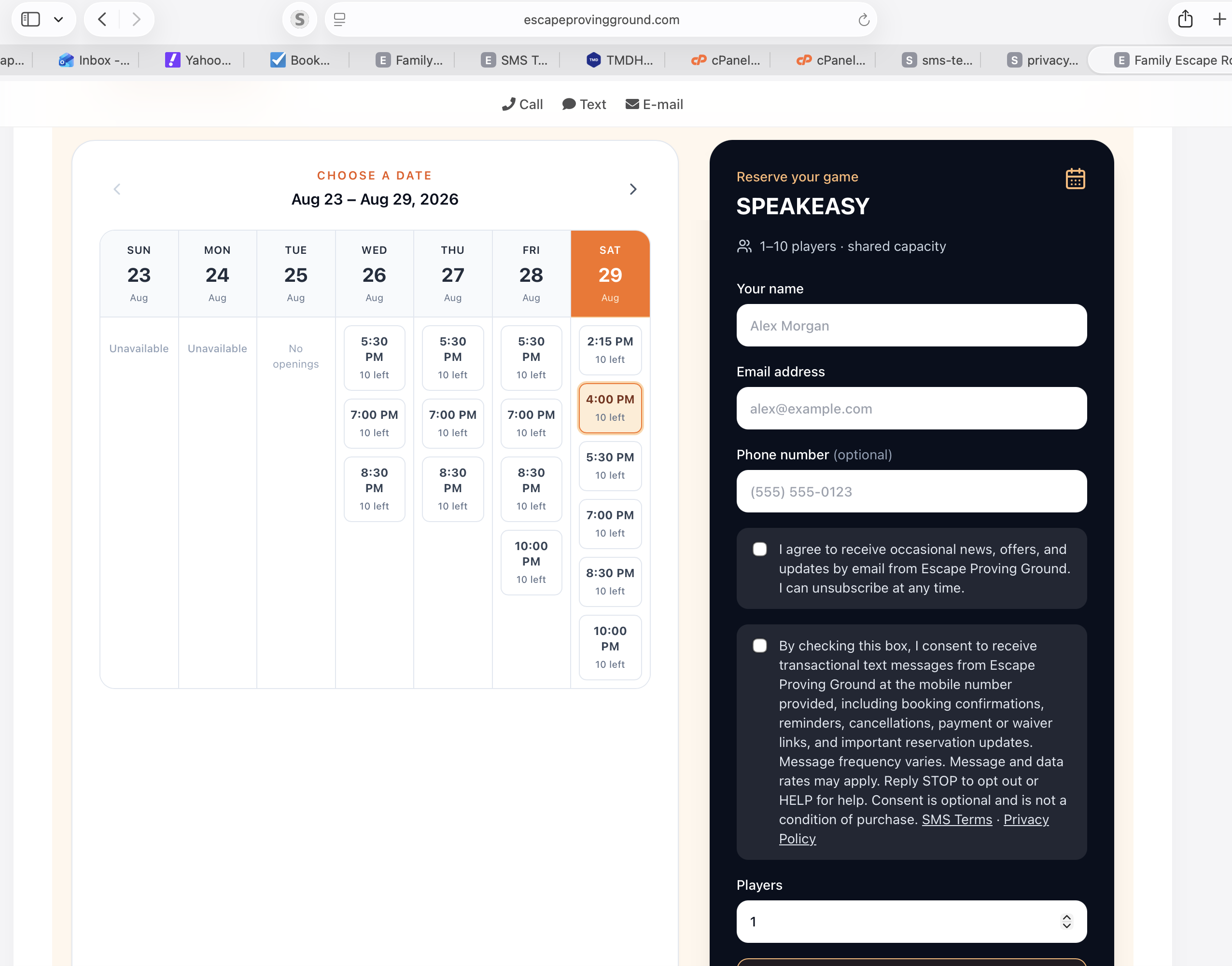
Entering a phone number alone does not provide consent. Proactive booking texts are enabled only when the customer affirmatively selects the separate checkbox.
Program details
BusinessEscape Proving Ground
Messaging number(443) 351-6659
Message typesTransactional booking and customer-care messages
Frequency and chargesMessage frequency varies. Msg & data rates may apply.
Opt outReply STOP at any time.
HelpReply HELP or call (443) 305-2786.
If a customer previously opted out, they may re-enroll by texting START or UNSTOP to (443) 351-6659. Escape Proving Ground does not use purchased lists, verbal enrollment, paper forms, QR-code enrollment, or prechecked consent boxes for this campaign.